I enjoy keeping up with the news, reading articles, and diving into interesting stuff online. But these days, it's genuinely hard to deep dive on everything the moment you find it. You open a link, see a promising headline, and then you're staring at a massive essay that you know you're not going to read right now. I wish this had a TL;DR.
I've tried summarisation tools. The flow is always awkward: copy the text, paste it into a chat window, wait for a response. And worse, most of them send your data to someone else's server. That article about your finances? That confidential PDF from work? Shipped off to the cloud without a second thought.
Privacy means a lot to me. So I built my own Chrome extension that summarises anything using a local LLM. No cloud. No API keys to pay for. No data leaving my machine. And I built the whole thing in a single session using Claude Code as my pair programmer.
The Idea was simple:
- Click a button on any web page or PDF
- Extract the text
- Send it to a local LLM running on my machine (via [LM Studio](https://lmstudio.ai/))
- Get a summary back
- No accounts. No subscriptions. No privacy trade-offs. Just a local model doing its thing.
Building It with Claude
I'm not a programmer, let alone a Chrome extension expert. I knew roughly what I wanted and let Claude guide me through it.
The workflow felt like directing a project. I'd describe what I wanted in plain language, and Claude would implement it. When something didn't work, we'd debug it together. When I changed my mind about the UX, we'd pivot immediately.
There's something cathartic about seeing your ideas come to life almost magically. When I was curious about something, I'd just ask. I picked up a few things along the way.
What Summarize This Actually Does
Summarize This ended up with more features than I originally planned:
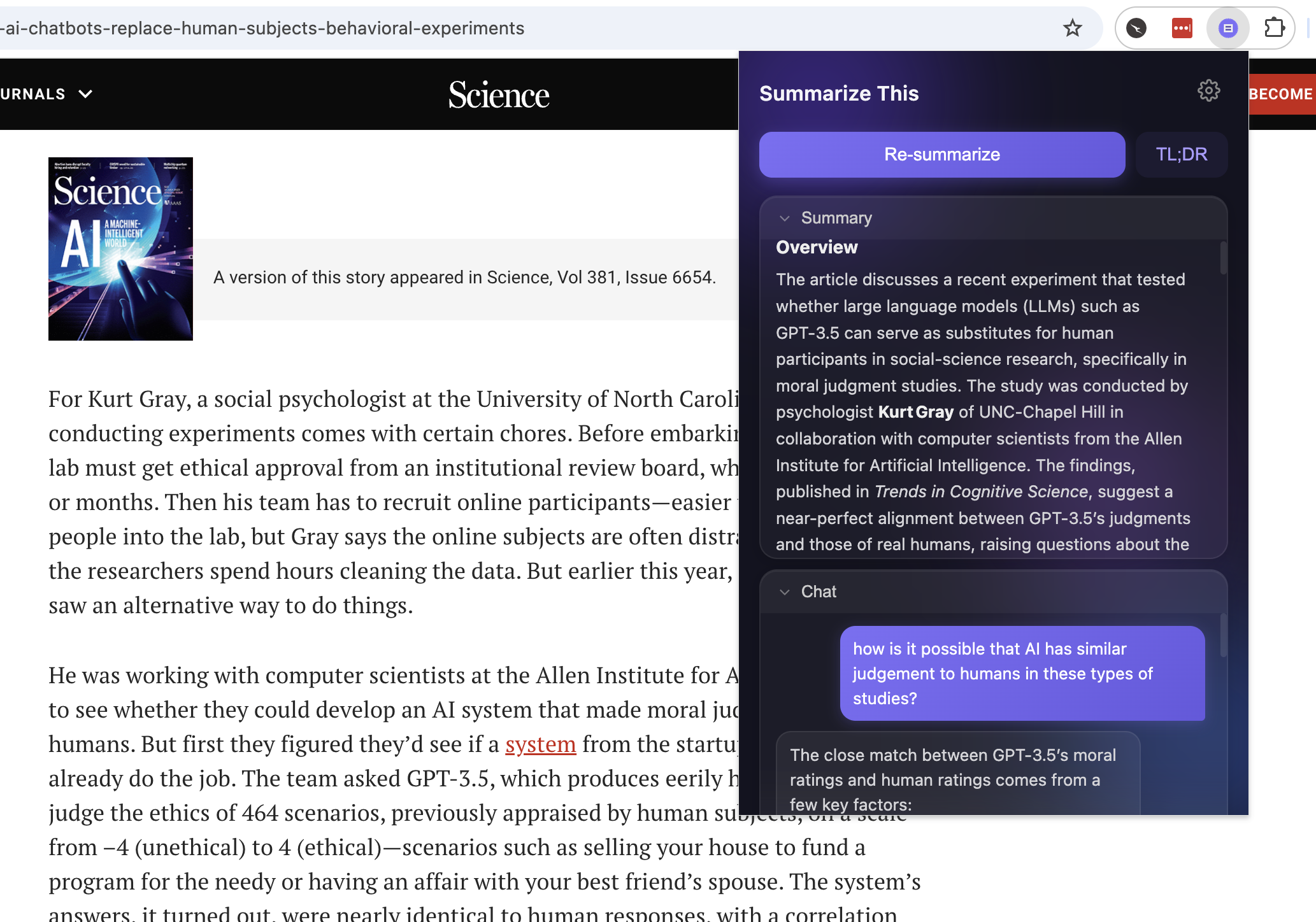
- One-click detailed summaries: click 'Summarize' and get an in-depth breakdown of any web page or PDF. The extension auto-retries with smaller inputs if the model's context window can't handle the full page.
- TL;DR mode: if the detailed summary is too much, hit TL;DR for a condensed version.
- Follow-up chat: ask questions about the page content directly in the extension. "What were the three main arguments?" or "Explain the methodology section."
- History: every summary is cached locally. Reopen a page you've already summarised and it's instantly there.
- Export save summaries as `.md` files or copy to clipboard.
- PDF support extracts text from PDFs
The Privacy Angle
This is the part I care about most.
- Everything stays on your machine: Summaries and chat history are stored in the browser's local storage. Not synced to the cloud.
- The only network request is to your own LLM server running on localhost.
- No analytics, no telemetry, no tracking.
In 2026, when every tool wants to upload your data to train a model or "improve the experience," there's something refreshing about software that just doesn't.
Try It Yourself
The extension is open source and takes about five minutes to set up: Full instructions are in the https://github.com/VectorAdNardis/SummarizeThis